

Scenario:
You are using MDT 2012 Update 1 (Lite Touch or Zero Touch), you have enabled MDT monitoring and you would like to know if the deployment of the machine was ok.
Solution:
Use PowerShell to read from the event log, since the MDT Monitor feature will write in the event log
Display on screen in text
Get-EventLog -ComputerName MDT01 -LogName Application -Source MDT_Monitor | select TimeGenerated, EntryType, InstanceID, Message | Format-Table

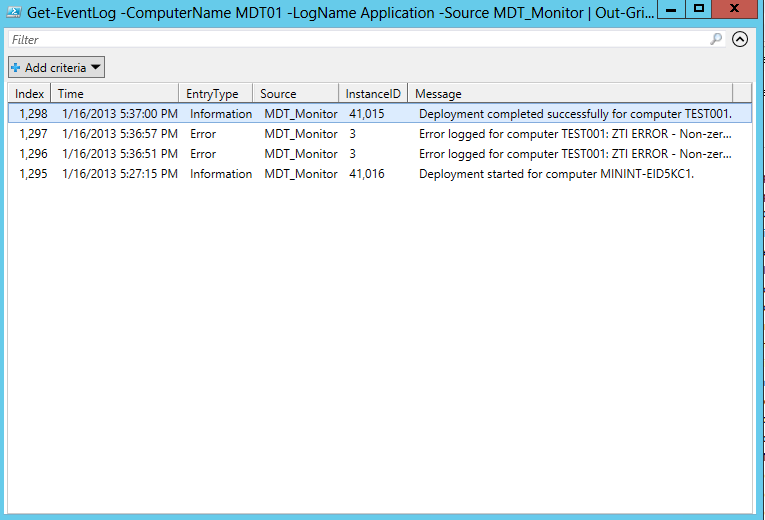
Display using the gridview
Get-EventLog -ComputerName MDT01 -LogName Application -Source MDT_Monitor | Out-GridView
Display using HTML
Get-EventLog -ComputerName MDT01 -LogName Application -Source MDT_Monitor | select TimeGenerated, EntryType, InstanceID, Message | ConvertTo-Html -title "OS Deployment status: $ENV:COMPUTERNAME" -body (get-date) -pre "<H1>OS Deploymentstatus for: $ENV:COMPUTERNAME </H1><P>Generated by Corporate IT</P>" -post "<P>For details, contact Corporate IT.</P>" > $ENV:TEMP\MDTstatus.htm; Invoke-Item $ENV:TEMP\MDTstatus.htm

/mike
Share this:

Categories: Deployment, MDT, PowerShell

 The Deployment Bunny
Thanks for sharing Mike.
You Rock.
//Thomas Strøbæk
Tnx :-)
perfect :D
Fantasic Mike, thanks a lot